Settings > Server > Redis
Redis is an open source (BSD licensed) in-memory data structure store used as a database, cache and message broker.
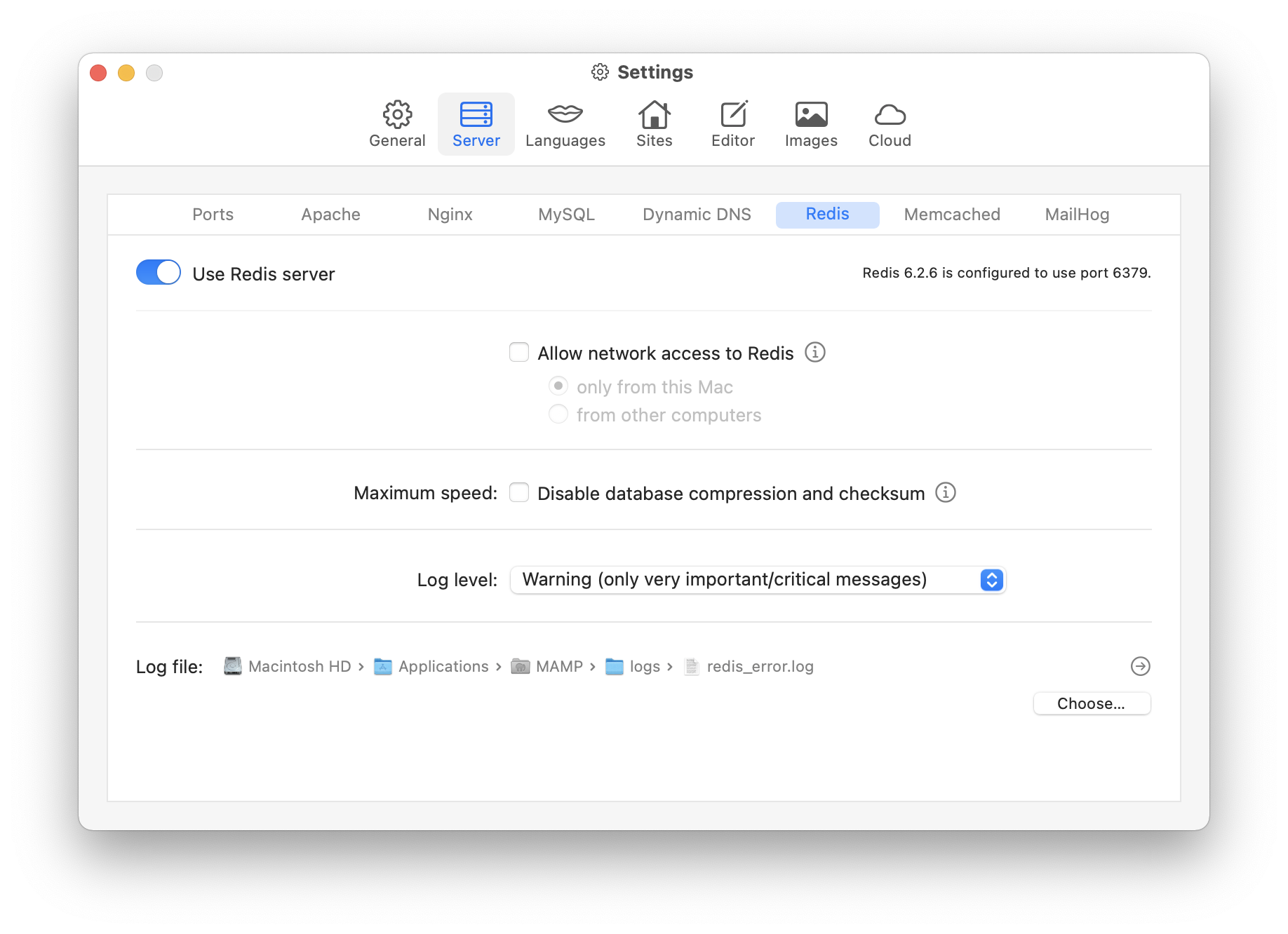
In the upper right corner of this screen you will find information about which version of the Redis server is being used and which port is being used.
-
Use Redis server
Check this box if you want the Redis server to start and stop automatically when the Start/Stop button in the toolbar is clicked. The Redis PHP extension is automatically included when this option is enabled. -
Allow network access to Redis
With this option enabled local and network clients can connect to Redis. Otherwise only local clients can connect (using the Unix socked “/Applications/MAMP/tmp/redis.sock”).-
only from this Mac
Only applications installed on this Mac can access Redis via network features. -
from other computers
Redis will answer any network request, even from computers on the Internet, depending on your network settings.
-
-
Maximum speed
- Disable database compression and checksum
Your data is kept in memory by the Redis server. The data is backed up automatically from time to time or manually to a file on disk. By default, the data is compressed and a CRC64 checksum is generated (for higher data integrity). If you enable the checkbox, the data is not compressed and the checksum is set to 0. When importing such a file, the content is not checked in combination with the checksum.
- Disable database compression and checksum
-
Log level:
Select how much information should be written to the Redis log. The following options are available:
Name Description Warning only very important/critical messages are logged Notice moderately verbose, what you want in production probably Verbose many rarely useful info, but not a mess like the debug level Debug a lot of information, useful for development/testing -
Log file:
The path to your Redis log file.- Choose…
Here you can choose the directory and the file name. By default, this log file is located at “/Applications/MAMP/logs/redis_error.log”.
- Choose…
PHP Examples
Connect using a UNIX socket (recommended)
// Connecting to Redis server on localhost
$redis = new Redis();

$redis->connect('/Applications/MAMP/tmp/redis.sock');

// Check whether server is running or not
echo 'Redis is running: ' . $redis->ping() . '<br>';

// Set the value of a key
$key = 'product';
$redis->set($key, 'MAMP PRO');

// Get the value of a key
echo 'Key "' . $key . '" has the value "' . $redis->get($key) . '"' . '<br>';

// Store data in redis list
$redis->lPush('list', 'MAMP PRO');
$redis->lPush('list', 'Apache');
$redis->lPush('list', 'MySQL');
$redis->lPush('list', 'Redis');

// Get the list data
$list = $redis->lRange('list', 0, 3);
echo '<br>';
echo 'Stored list:';
echo '<pre>';
print_r($list);
echo '</pre>';

// Clean up
if ($redis->exists([$key, 'list']) === 2) {
  $redis->del($key);
  $redis->del('list');
}
Connect via network
// Connecting to Redis server on localhost
$redis = new Redis();

$redis->connect('127.0.0.1', 6379);

// Check whether server is running or not
echo 'Redis is running: ' . $redis->ping() . '<br>';

// Set the value of a key
$key = 'product';
$redis->set($key, 'MAMP PRO');

// Get the value of a key
echo 'Key "' . $key . '" has the value "' . $redis->get($key) . '"' . '<br>';

// Store data in redis list
$redis->lPush('list', 'MAMP PRO');
$redis->lPush('list', 'Apache');
$redis->lPush('list', 'MySQL');
$redis->lPush('list', 'Redis');

// Get the list data
$list = $redis->lRange('list', 0, 3);
echo '<br>';
echo 'Stored list:';
echo '<pre>';
print_r($list);
echo '</pre>';

// Clean up
if ($redis->exists([$key, 'list']) === 2) {
  $redis->del($key);
  $redis->del('list');
}